- Designed for simulation project workflows
- Bring live FlexSim model operations into broader agent-assisted project work
- Select and work with one or more connected FlexSim sessions
- Use compatible agent harnesses to coordinate multiple agents when the project requires it
- Open, extensible architecture
- Select an AI provider based on its performance, cost, data residency, and governance requirements
- Use a compatible agent harness that supports the Flexcon Eidos workflow
- Use compatible local or self-hosted AI models if necessary
- Apply your organization’s security and data-governance controls at the deployment layer
- Adapt workflows through custom skills and project-specific integrations
Flexcon Eidos
What is Flexcon Eidos?
Flexcon Eidos is a professional integration layer that connects modern AI agents with FlexSim models. It enables simulation experts, consultants, module developers and partner organizations to use AI-assisted workflows with FlexSim: from advanced model analysis and simulation execution, to documentation, development, troubleshooting, and goal-driven work.
AI-assisted Simulation Workflows with FlexSim
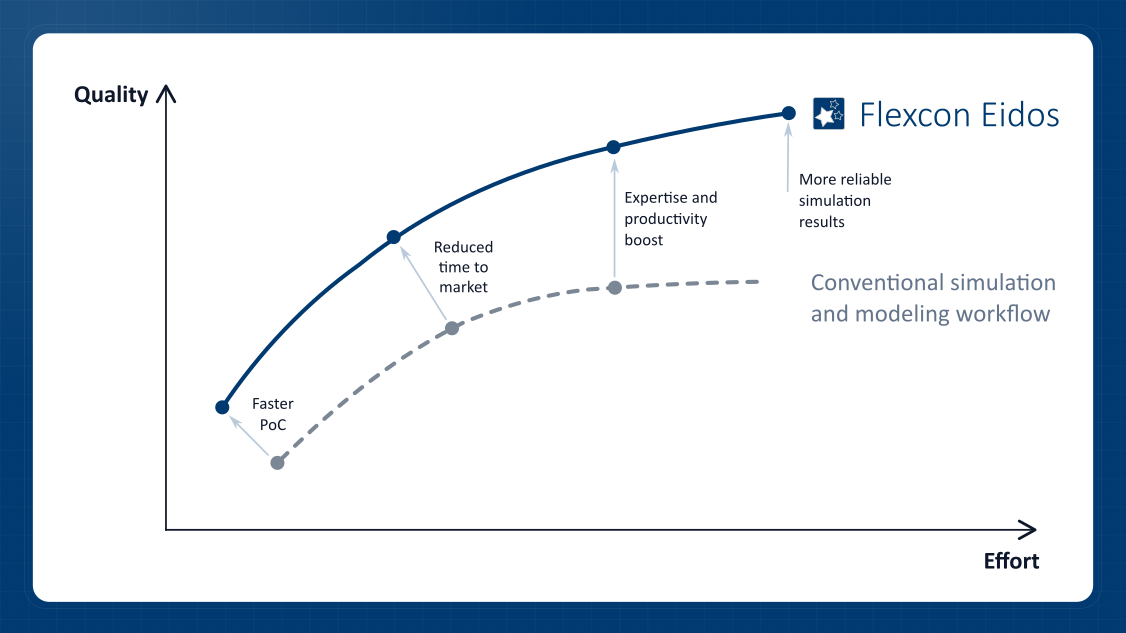
Flexcon Eidos helps experienced simulation engineers work more efficiently, produce higher-quality simulation results, and apply Flexcon’s expertise through reusable agent-assisted workflows.
Full Project Context
Flexcon Eidos allows AI agents to work with the full project context, not confined only to a FlexSim model. FlexSim is available as a tool for broader knowledge work, alongside local files, technical documentation, code repositories, databases, web resources and other enterprise systems. The AI agent can operate with full awareness of the surrounding project context, goals and conventions, while delegating FlexSim-specific operations to Flexcon Eidos.
Open Architecture
Flexcon Eidos uses the Model Context Protocol (MCP) to expose FlexSim operations to compatible agent harnesses. Organizations can select among supported harnesses and model providers, including compatible local or self-hosted AI models. Deployment, data residency, and governance depend on the selected harness, model provider, infrastructure, and organizational controls.
Flexcon Eidos runs locally alongside FlexSim on Windows. Communication between its local services and connected FlexSim sessions is restricted to the local machine and protected by token-based authentication. Data sent to an AI provider is governed by the selected agent harness, model provider, and deployment configuration. Flexcon Eidos keeps FlexSim operations explicit, allowing changes to be inspected, tested, and reviewed before the model is saved.
Flexible Usage Scenarios
FlexSim Model Engineering. Within a selected model open in FlexSim, an AI agent can use Flexcon Eidos to inspect existing structure and logic, create and configure tools and objects, author and refactor FlexScript, modify Process Flow logic, adjust model parameters, run simulations, investigate model behavior, retrieve and analyze results, and save reviewed changes.
Simulation Project Lifecycle. In broader project workflows, an AI agent may work with spreadsheets, databases, CAD files, specifications, requirements, and other project sources through capabilities provided by its harness and connected tools. Flexcon Eidos gives the agent structured access to FlexSim models, allowing it to inspect model structure, make controlled changes, run simulations, and retrieve results. The agent may then combine those results with the wider project context to compare scenarios or prepare reports.
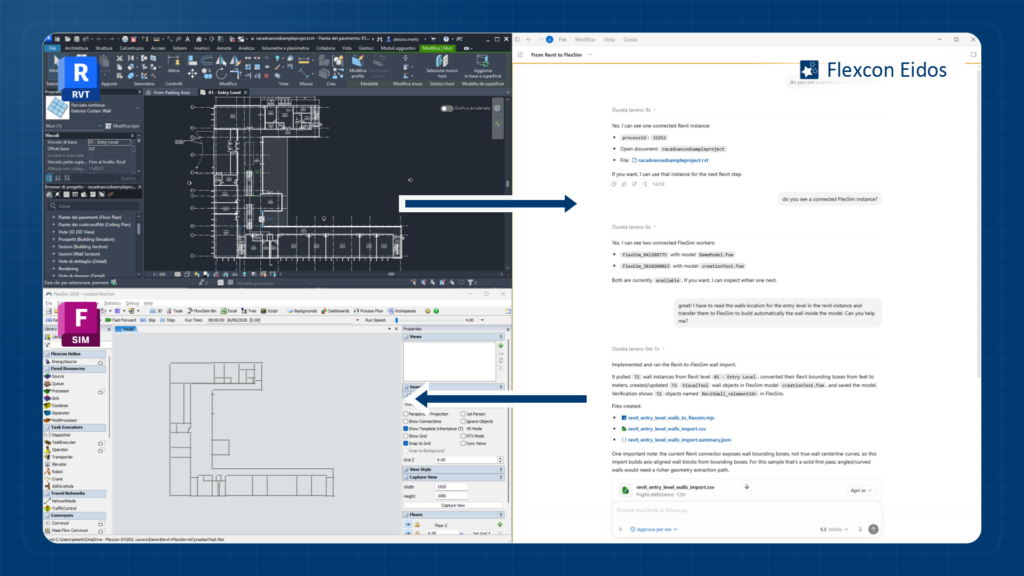
Multi-Model Workflows. Flexcon Eidos allows an AI agent to select and work with one or more connected FlexSim sessions. The agent can inspect and compare model structures, configurations, logic, behavior, and results across those sessions, or adapt reviewed work from one model for use in another. A compatible agent harness may coordinate multiple agents or subagents to manage more demanding, longer-running tasks, while Flexcon Eidos provides structured access to each selected model. Project-specific workflows can be extended through custom skills and integrations.
Possible Use Cases
Flexcon Eidos supports a wide range of AI-assisted engineering use cases across simulation development, model maintenance and project execution. By giving AI agents structured access to live FlexSim models, it enables them to assist with technical analysis, software development, documentation, validation and engineering automation. Flexcon Eidos reduces repetitive work and helps complete simulation projects with greater consistency, traceability and control. Typical use cases include:
| Scenario | Use Case | Description |
|---|---|---|
| FlexSim Model Engineering | Understanding inherited or complex models | Inspect object hierarchies, Process Flow logic, FlexScript and model relationships to accelerate model comprehension. |
| FlexSim Model Engineering | Technical documentation | Generate and maintain up-to-date technical documentation matched to FlexSim models and simulation results. |
| FlexSim Model Engineering | Troubleshooting and validation | Check assumptions, identify potential inconsistencies for engineering review, trace and analyze dynamic behaviors. |
| FlexSim Model Engineering | Code authoring, review and refactoring | Write, review, and refactor FlexScript code. Using Flexcon Eidos, the agent can update and test model code, accepting changes only when the defined regression checks pass. |
| FlexSim Model Engineering | Hybrid simulation projects | Support projects that combine FlexSim with C++, Python, C# source code, engineering documents, specifications and automation software. |
| Simulation Project Lifecycle | Engineering task automation | Automate repetitive engineering tasks such as reading 2D/3D CAD data, extracting geometry, processing and importing statistical data. |
| Simulation Project Lifecycle | Virtual commissioning support | Assist in preparing Flexcon Emulation environments from exported PLC variable lists and automation data. Work faster and minimize human errors. |
| Simulation Project Lifecycle | Simulation-driven decision making | Reduce the time to move from a business idea to simulation-based insights. Analyze model results in the context of project goals and requirements. |
| Simulation Project Lifecycle | Experimentation and reporting | Launch simulation campaigns, collect KPIs and summarize results for engineers and business stakeholders. |
| Simulation Project Lifecycle | From an idea to a model | Sometimes, a sketch or a model idea is enough to get the first runnable FlexSim model, and start iterating on this proof of concept as early as possible. |
| Multi-Model Workflows | Multiple requests in parallel | Supported harnesses can run specialized subagents independently on the same project and manage several simulation requests or test different hypotheses simultaneously. |
| Multi-Model Workflows | Interact with multiple models | Exchange information between multiple FlexSim model instances, compare model logic, configuration, results and dynamic behavior. |
| Multi-Model Workflows | Scenario comparison | Analyze alternative model versions and compare their outputs more efficiently. Compare simulations to a historical or a reference model. |
| Multi-Model Workflows | Model merge and reuse | Assist in reviewed copy and adaptation of features from one FlexSim model to another, extract reusable components, compare implementation details of different models. |
Designed for Professional Simulation Teams
Flexcon Eidos is intended for professional FlexSim users and organizations that want to bring state-of-the-art AI capabilities into simulation work without replacing the expertise of the simulation specialists. It helps experienced users work faster, investigate models more deeply, and make FlexSim part of modern AI-assisted engineering and consulting workflows.
Key Advantages:
Licensing and Requirements
Flexcon Eidos runs on top of a standard FlexSim installation. A valid FlexSim license is required, together with a Flexcon Eidos license.
Contact Flexcon to find out more information about Flexcon Eidos.